


Manage settings
Manage the Club-House
Configure your club's restaurant and café module
The Club-House is a service offered by some clubs to provide refreshments, meals, or other amenities to members. The Club-House module in Plugin.ch lets you manage this activity with a complete system for orders, billing, and accounting. This section guides you through setting up and activating this module according to your club's needs.
Access the Club-House settings
From your admin dashboard, navigate to Settings (or Settings, depending on your interface), then select Manage the Club-House.
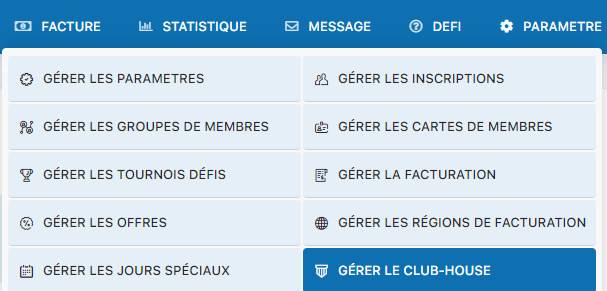
Menu for accessing Club-House management
Activate the Club-House module
The activation screen lets you turn on the module. Select Yes for the “Use Club-House” option to activate this service in your club:
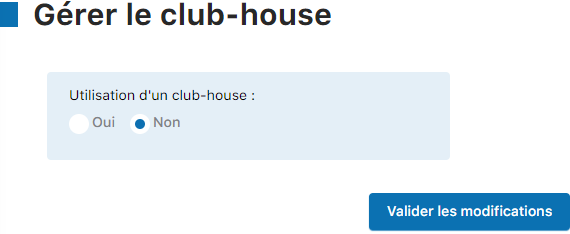
Selecting Yes to activate the Club-House
Configure all Club-House settings
Once activated, you access the complete Club-House configuration panel. Fill in all available settings according to the specifics of your food service:
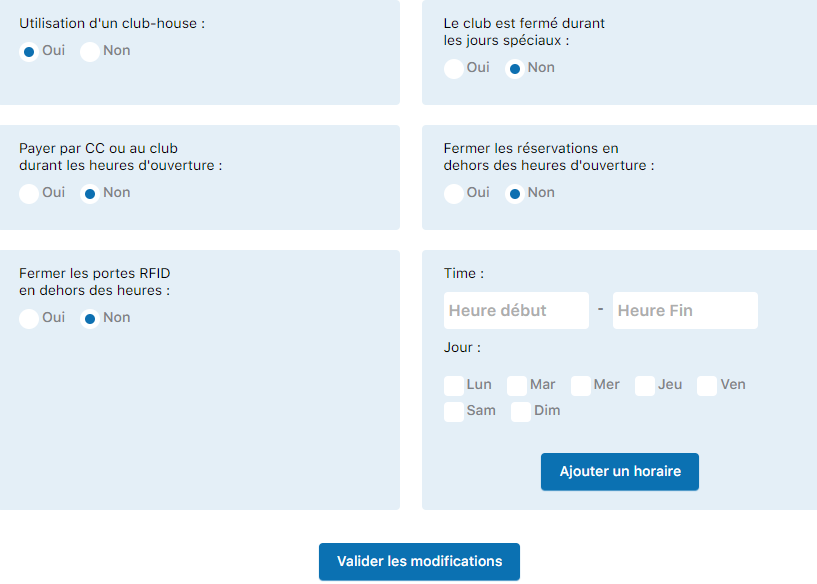
Configuration panel with all available settings
Key settings to configure:
- Opening hours : Set the hours during which the Club-House is open
- Opening days : Indicate the days of the week during which the service operates
- Menu and prices : Establish the list of available items and their prices
- Capacity : Indicate the number of available seats or maximum capacity
- Manager : Designate the person responsible for managing the Club-House
- Access conditions : Specify who can access the service (all members, certain categories, etc.)
- Accepted payment methods : Indicate how customers can pay (cash, member account, card, etc.)
- Accounting account : Link the Club-House to the appropriate accounting account for financial tracking
- Any other specific setting depending on your system configuration
Finalize the configuration
After filling in all the necessary fields, click the button to save and fully activate the Club-House module. Your food service will then be available to your members.
💡 Tip: Set up the Club-House menu and prices thoughtfully. Check with your food service manager or Club-House operator to make sure all products and services are properly listed with the correct prices. Good initial setup greatly simplifies future management of the service.
Plugin.ch Tutorial — Manage settings